Keep in mind that just because you see something written on these pages, it doesn't mean that it's true. A lot of it is obsolete, as I haven't had the time to keep the pages up to date.
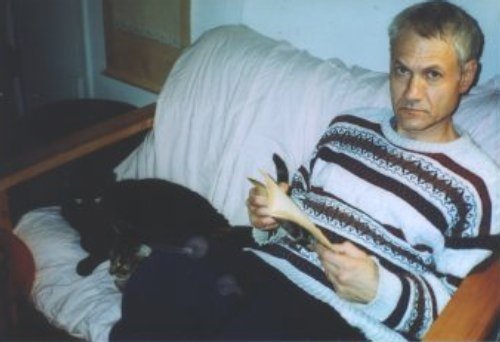
Since I know a lot of people only through email, some of course, are curious about what I look like--so, here's a shot from the Fall of 2004, I think. Sigh, when I first put that up, it was harder finding pictures of people. I fear I've gotten uglier with age.
So, without further ado....
The Newbie Survival Guide
An effort to explain to the newcomer why he might have been flamed,
told to RTFM, etc. Read it, and you may be able to post to any list
with confidence. (Hrrm, that's a bit of false advertising--but
anyway, you should read it.)
Useful shellscripting links
Some shellscripting links that I've found useful.
Using irc clients with Slack
As of May 15, 2018, Slack dropped their
support for irc gateways. This explains how to use weechat or irssi with
Slack
A chmod tutorial
This tutorial, written by John O'Donnell, is used with his permission.
Using setuid, setgid and the sticky bit
Have more precise control of permissions.
RPMS, tar, and compressed files
Overview of tar, rpms, and various compression formats.
OpenLDAP
An introduction to using OpenLDAP for authorization and as an address
book. Somewhat dated, but still useful.
the Pine email client
Pine has now become alpine. I haven't used it in over 10 years, but leave
this for historical reference.
Setting up Mutt
This includes configuring other programs to work with it. (Getmail, msmtp and
maildrop.)
Getmail with gmail
Google has made a few extra steps necessary to continue using getmail with your gmail account.
Using getmail
Setting up the getmail program for version 4.x
Using XBuffy and GBuffy
These are two nice little utilities that do a good job of handling
multiple mailboxes. I don't think either is maintained anymore.
Using SSH
This is pretty RedHat specific--however, as security becomes more
important, it's becoming more and more of a bad idea to use telnet.
RedHat disables telnet by default in its newer versions. It's
actually easier to set up SSH than telnet, and you really should.
This explains how to do it. Last updated in 2002, another one left for
historical reference.
Using Fluxbox
Fluxbox was my window manager of choice for years.
Openbox for Fluxbox users
Mostly for my own reference, some simple Openbox keybindings and
toolbars. The keybindings are also applicable to the increasingly
popular LXDE desktop.
The dwm window manager
The dwm window manager is a small tiling manager. I find it especially
useful on netbooks.
The spectrwm window manager
Aanother very nice tiling window manager.
Grub2
These are some notes of things I'm running into using grub2 on Fedora
16. Please consider this a work in progress. At present, it's very
sparse.
Starting with Samba
Using Samba on the home network--a simplified guide.
Connecting Samba to Active Directory
Using Samba in an Active Directory domain
ArchLinux
When this article was written, in the early 2000's, it made Arch's
documentation page, and its description called it a nice i686 optimized
distribution. Left for historical reference, and to show my Arch using
friends that I was into it before they were.
Japanese in Linux and some BSDs.
This covers several distros of Linux and BSDs. The Tokyo
Linux User Group includes a link to this on their web site.
Fdisk
Linux's fdisk is a far more sophisticated tool than the fdisk that
comes with DOS. However, it's not that hard to use--there are times
when the various gui or simpler partitioning tools don't work and
fdisk will. Like many things in Linux, once you get used to it, you
might grow to prefer it to the graphic disk partitioning tools
Some Xterm settings
This is one that I put up so I wouldn't have to look it up each
time. It deals with setting the TERM variable, and concentrates on
the rxvt terminal
Some quick fixes for CUPS
When CUPS works right it makes printing easy. These are a few simple gotchas and fixes that I've collected--some from me, some
from various forums and mailing lists. This page is very outdated
Using the citicards.com site
Recent "improvements" in Citibank's citicards.com site have made it
difficult to use in Linux and BSD. I tried to keep my rant to a minimum
and just detail the problem and solution.
Using vpnc
A short guide to the vpnc program.
Copying and Burning DVDs
Various command line tools for dealing with DVD and multimedia.
Accessing Usenet
Accessing Usenet, as well as pptp VPN, with the command line.
The Screen and Tmux Programs
A very basic guide to using either the venerable screen or newer tmux to
run multiple sessions in one terminal
Scanning and Printing from Command Line.
After getting a new MFC printer I began playing with it on various
systems. This page is mostly for myself, but it may help people wanting
to scan and/or print without X or Wayland.
Installing
Software on various Linux and BSD systems
Installing
from source tarballs
Using diff and
patch
Backing up DVDs
from the command line
Fetchmail
Getmail
Maildrop
Mutt
Using mutt with a
gmail account
Using Fdisk
Running programs at
boot on various systems
Samba
Using ssh keypairs
Ssmtp
Installing Gentoo
Linux
Checklist
for installing Gentoo
Chrooted
Gentoo
Inputting
Japanese
Screen
NTPD
Shell prompts
Pure-ftpd
Ftpproxy
MRTG
FreeBSD jails
Ezjail
Mlterm
Convert AC3
audio to OGG Vorbis
RHEL9 and clones
A brief, and probably soon to be outdated article on using RHEL9,
(Actually AlmaLinux-9) as a desktop, written a little over a month
after release.
Reset RedHat root password
With RHEL9, there's a bug (or perhaps change) in resetting the password. This method works with both RHEL8.x and 9.x as well as clones such as RockyLinux.
Building rpms
A quickstart for the novice.
Fedora Sound Problems
Lately, many people have been having sound problems. This page was
thrown up to try to collect some links about it, and then other folks
started mailing me their solutions. If you're one of the many
having Fedora sound problems in Fedora 8, perhaps one of the solutions
will help.
Fedora and wpa_supplicant
There are a few wireless issues in Fedora 8. This covers some issues
with the fact that network starts before wpa_supplicant and
using MadWifi with the Atheros 5007EG card.
Finding the model of your wireless card
A lot of people post on Fedora forums asking for help with wireless, but
neglecting to give the model of the card. This page is primarily to
save me typing, over and over again, the steps for someone to find out
which card they have.
Simple wireless troubleshooting
Many times, wireless troubles are due to NetworkManager or another GUI
configuration tool. This article gives some tips on troubleshooting
wireless with the command line.
Watching Netflix in RHEL6 and clones
Although Linux's version of google-chrome enables
you to watch Netflix, it doesn't work on RHEL6 and its clones. This
describes setting up a docker instance with a version of google-chrome that
works with Netflix
Installing a a minimal desktop on a RedHat based system
This is my method for getting a small working X installation, for those who
don't want all the packages included with the default package group.
Recovering another distribution's grub
Many people have, for example, Ubuntu installed, then install Fedora.
Although they make sure that Fedora didn't overwrite the Ubuntu
partition, they don't see Ubuntu as an option in Fedora's grub. This
short article explains how to fix that. This article is now somewhat
depreacated as both Fedora and Ubuntu now use grub2
Editing Fedora's grub
One of Fedora's many moronic defaults is to make
grub have a default setting of 0 timeout. As Fedora is so often broken,
it frequently becomes necessary to edit grub before booting. This
covers methods to get to the grub menu, and a proactive method of
keeping the problem from arising in the first place. This artice is also
deprecated as grub2 now has a timeout.
Using the yum provides option.
Explains the useful "provides" option of yum, which enables the user to
find what rpm package provides a command, shared object, or other needed
file.
Using the kernel-devel package.
On Fedora Forums, one often sees the less experienced user having issues
with understanding which kernel-devel package is necessary.
The "command not found" problem in Fedora
This question frquently arises on Fedora forums, so this is a quick
explanation of the PATH variable. (For those not used to Fedora, normal
users didn't have /sbin or /usr/sbin in their PATH until F10.)
Using sudo with Fedora
People coming from Ubuntu, or newcomers following tutorials that
recommend sudo are often confused by the fact that unless they edit the
/etc/sudoers file, sudo won't work. This short article explains the
basics of using sudo with RH based distributions.
A brief comparison of VMware Server, VirtualBox
and KVM
A casual comparison of three popular virtualization methods.
A quick guide to bridged networking on
VirtualBox with a Linux host
VirtualBox's bridged networking (prior to version 2.1.0) confused
some people--this is an effort to give a very quick introduction to it.
This is in the Fedora section because their old manual's instructions
on bridging in Fedora weren't always clear to the newcomer. Although
this article is no longer necessary for VirtualBox it might still be
useful for anyone who wants to set up bridged networking.
VMWare-server
Installing VMWare-server-1.04 on Fedora 8
KVM Virtualization on CentOS-5.1.
Using KVM on CentOS.
Using Linux-VServer with CentOS
Linux-VServer is a method of chrooting guest operating systems. It is
similar to a FreeBSD jail, and quite useful.
NX and FreeNX
I used to use FreeNX and NX for remote GUI connections. This page hasn't
been updated since NX updated their client.
X2go and xpra
Some people, including myself, dislike the later NX
client. This gives an overview of x2go and xpra, two possible
replacements.
VNC server on Fedora 17
Using tigervnc-server in Fedora has drastically changed. This brief
article explains how to use it in Fedora 17 and later.
Setting up Apache with Jailkit in CentOS
Using the jailkit program to chroot an Apache server.
Common samba problems and fixes
Quick fixes to some common samba problems.
Installing RT3 (Request Tracker) on CentOS
This is how I managed to install RT3 on CentOS. At time of writing,
(August 2010), it's still non-trivial
Fix for VMware issue on Fedora
Fix for the Fedora issue of VMware being unable to find kernel-headers
A quick look at LVM
LVMs are useful but many people find them confusing.
The Acer Aspire 4720z
A brief page about what did and didn't work for
me with the Acer Aspire 4720z. (With Fedora and Ubuntu.)
The Acer Aspire One (8 GB SSD Linux version)
My experiences with the popular Aspire One netbook.
The Acer Aspire One (160 GB HD version)
Although the 160 HD version comes with Windows XP, I removed XP and
installed various Linux distributions on it. So far, all of them work
quite well.
Flashing the Bios on the Aspire One
Many users have experienced the Aspire's "Black Screen of Death." This
can often be fixed by flashing the BIOS. This is an elaboration of the
excellent macles blogspot article about it, with a bit more detail for
the newcomer.
Using Linux on the Yoga 2
A couple of notes on the already deprecated Lenovo Yoga 2
The New Upstart Init System
Rather than using /etc/inittab, Fedora now uses Upstart. This very
brief page explains how to change from the default runlevel 5 to
runlevel 3 under the new system. However, it seems to have already been
changed so that one can once again use /etc/inittab. (Actually systemd made
this obsolete, for better or worse, but I'm lazy.)
FreeBSD for Fedora users
Many folks ask about FreeBSD on Fedora forums. This isn't an exhaustive
treatment of FreeBSD, simply an overview of what Fedora users might
expect if they try it.
Mounting ext4 partitions in FreeBSD
As the title says, mounting ext4 partitions on a FreeBSD system
A few Wayland tips
RedHat is planning to only use Wayland in RHEL10, dropping X11 support. This page gives a brief
rundown of how I used Wayland on Fedora, (labwc, a replacement for
openbox) and FreeBSD. (labwc again and also dwl, a replacment for dwm)
Installing 64 bit Flash
At present, 64 bit Flash is still considered alpha by Adobe. However,
it's working well and this simple article tells you how to use it.
Pipewire and HDMI
Using pipewire to have a laptop automatically use HDMI speakers when
connected.
Updating FreeBSD
A now deprecated page, left in as placeholder. Replaced by the one
below.
FreeBSD
An attempt to update some of the information in the cvsup page, as
well as cover some other things. It also has a small section on
differences between FreeBSD and Linux commands.
A quick explanation of FreeBSD's naming
system
This was actually written by Freddie Cash and used with his kind
permission. It explains the difference between CURRENT, STABLE and
RELEASE, a subject which seems to cause much confusion on mailing lists
and forums.
Setting up a vacation response
Sometimes, the simple vacation program doesn't work. Also, one can
do a few more things using maildrop to create various rules. This
article covers setting up a vacation response with postfix, getmail
and maildrop.
Using the pf packet filter
This is a real beginner's guide to using pf, which is becoming the
most popular packet filtering software in the BSDs. It is only an
introduction.
Copying audio CDs in FreeBSD
My lame script for making (legitimate backups of course) copies of
audio CDs in FreeBSD, using the builtin dd and burncd commands
Stupid Korn Shell Tricks
Another fairly lame page, but it has a few basic things that might
help the convert to ksh from bash get their ksh working the way
they want it to work.
Running Bhyve and VirtualBox on the Same
Machine.
Using VirtualBox on a Machine with Bhyve.
FreeBSD Jails
A guide to jails in FreeBSD, current as of 9.2-RELEASE.
Multiple FreeBSD Jails with nullfs
Using a nullfs mounted template to simplify multiple jail creation.
Zabbix on FreeBSD-9.2
This just covers basic Zabbix installation on FreeBSD with MySQL and
Apache. It doesn't cover configuration of the server once installed.
A quick start to FreeBSD wireless
A quickstart to setting up wireless in FreeBSD
FreeBSD and onboard Intel and AMD Video Cards
Using FreeBSD with newer video cards
FreeBSD and NVidia cards
FreeBSD has some minor issues with setting up NVidia cards. This page
gives some solutions.
Using git to update FreeBSD source code
FreeBSD has switched from subversion to git. This short page gives
proper syntax
NetBSD for the FreeBSD User
A page covering a few differences between the two operating
systems, put up in the hope that it makes it easier for the FreeBSD
user to configure NetBSD
Postfix, procmail and spamassassin.
Most howtos that I see go for more complex setups, but this should help
the newcomer configure postfix to use procmail to use spamassassin.
Multibooting OpenBSD
Installing OpenBSD onto a disk that already has other operating systems
X in OpenBSD
OpenBSD has changed how it uses X. This covers the changes.
Copying a FreeBSD system to a USB stick
Copying a running FreeBSD system to a USB drive
Humor, et al
Written while in the midst of my studies, this was an attempt to
lighten my own mood. Demian's drawing is pretty good, so take a
second to look at it. There's also a bit of exposition on working in IT.
Although this was from the early 2000's, I think, I like to think that much
of it still has value.
Subnetting
It really isn't that hard--this one has gotten me several emails,
thanking me for its clarity, so I'm kind of proud of it.
Japanese on MS Operating Systems
This one is a bit dated, as 2K and XP do very well at handling
Asian language, but it is still included in the welcome message to
the Nihongo-computing mailing list
This section has a few things that I found pretty funny. You may too.
Computer Haiku
If, rather than those rude and unhelpful error messages, MS put in
haiku--such as
Yesterday it worked
Today it is not working
Windows is like that
For newbies to the Internet
To quote the first line, "Most of us who have dealt with computers
and the internet for awhile have all had this experience--our
friend calls, and says, 'Guess what? I'm finally hooked up to the
internet and got 500 free hours with AOL. What's your email
address?'" Send this one to your newbie friends before you give
them your address
Some rules
For example, "When you don't know what to do, walk fast and looked
worried." Hey, it works for me
In the Beginning
An unknown author's idea of what might have happened if God was
using a computer during the Creation. If you're offended by
religious humor, then just skip this--personally, I think God has a
good sense of humor, so...
The Buffy The Vampire Slayer Quote
Generator
Exactly what it says--yeah, I know, I need to get a life.
Japanese 101
Written by Ben Cole, who used to write about his training in Japan
and has translated a recent book for Hatsumi sensei. Used with
permission
Japanese Phonetics
Originally made to go with an online dictionary (that was never
made) I wrote this as an explanation of Japanese pronunciation,
alphabetical order, etc.
Translating Bujinkan Writings.
I've forgotten if this was first put up as a web page and then Liz asked to use it in Ura and Omote or if it was written for Ura and Omote and then put up as a web page. Either way, several people have said nice things about it.
This is an older page--nowadays with the more advanced East Asian Language capabilities of many O/S's, most people can make their own kanji--a few years ago, however, I used to get many requests from people to make kanji for their web pages. The majority of these are Bujinkan specific, but there's a few others there.